








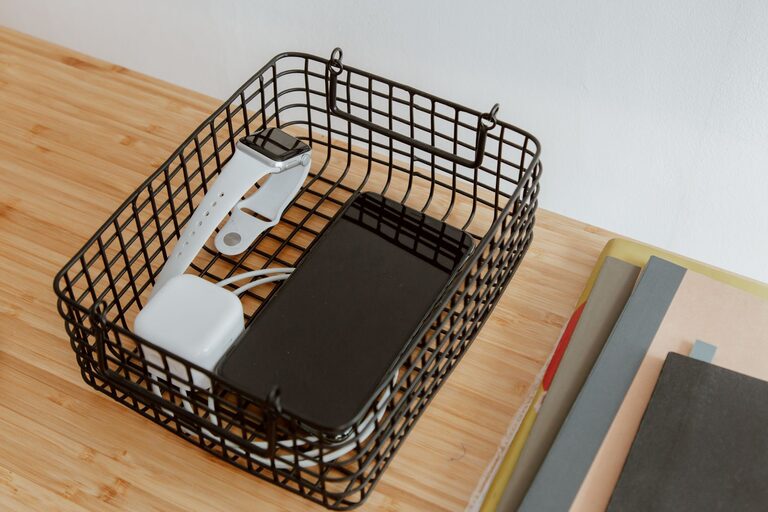
A dedicated charging station can make everyday life easier. Instead of searching for cables or finding devices with low batteries, you can keep everything in one convenient location. A well-planned station also reduces clutter and helps protect your devices from avoidable damage.
You do not need expensive equipment or a complicated setup. With the right location, reliable accessories, and a simple organization system, you can create a charging area that works for phones, tablets, smartwatches, wireless headphones, cameras, and other personal devices.
Choose the Right Location
Start by selecting a practical place for your charging station. The best location is easy to reach but does not interfere with daily activities.
Good options include:
– A desk or home office shelf
– A kitchen counter away from water
– A bedside table
– An entryway cabinet
– A living room console
– A dedicated shelf or drawer
Choose a dry, stable surface near a wall outlet. Avoid placing the station where cables may become a tripping hazard or where devices could easily be knocked to the floor.
Keep the area away from direct sunlight, heaters, radiators, and other sources of heat. Devices and chargers work best in a cool, well-ventilated location. Avoid enclosing active chargers in a tightly packed drawer unless the products are specifically designed for that use.
Take Inventory of Your Devices
Before buying accessories, list the devices you want to charge. This helps you choose the right number of ports and avoid unnecessary purchases.
Your list might include:
– Smartphones
– Tablets and e-readers
– Smartwatches
– Wireless earbuds
– Cameras
– Portable game systems
– Rechargeable batteries
– Fitness trackers
– Small laptops
Check which cable or connector each device uses. Many newer devices use USB-C, while older products may use USB-A, Lightning, or a device-specific connector. Some watches and earbuds use a special charging puck or dock.
Also note which devices need more power. A phone and smartwatch may charge comfortably from a standard USB port, while a tablet or laptop may need a higher-power USB-C charger.
Select a Suitable Power Solution
There are several ways to power a charging station. Your choice depends on the number and type of devices you use.
Multiport Wall Charger
A multiport wall charger is a compact option for several devices. Look for a model with enough ports for your regular needs and a power rating that supports your devices.
USB-C ports often provide more power than traditional USB-A ports. If you plan to charge tablets or laptops, choose a charger that supports the required power output. Use the specifications supplied by the device manufacturer as a guide.
Charging Dock or Stand
A charging dock keeps devices upright and organized. Some docks include built-in connectors, while others provide spaces for your own cables.
A dock is especially useful on a desk or bedside table because it keeps screens visible and makes it easier to place devices in the correct position. Choose a design with a stable base and enough space between devices.
Power Strip
A power strip can be useful when you need to connect several chargers or devices. Select one from a reputable brand with built-in overload protection.
Do not connect power strips to one another, and avoid overloading a single outlet. A power strip should sit on a stable surface where it will not be covered by clothing, paper, or other materials.
Wireless Charging Pad
A wireless charging pad can reduce cable clutter for compatible phones and accessories. It is convenient, but it may charge some devices more slowly than a wired connection.
Place the device flat on the pad and remove thick cases or metal accessories if they interfere with charging. Keep coins and other metal objects away from the charging surface.
Use Reliable Cables and Chargers
Cables are one of the most important parts of a charging station. Low-quality or damaged cables may charge slowly, disconnect frequently, or become warm during use.
When choosing cables:
– Buy from reputable manufacturers or trusted retailers.
– Select the correct connector for each device.
– Check that the cable supports the needed charging speed and power.
– Choose a length that reaches comfortably without excess slack.
– Replace cables with exposed wires, bent connectors, or damaged insulation.
Use chargers that are compatible with your devices and designed for the intended voltage and power requirements. Avoid using a charger that becomes unusually hot, makes noise, smells unusual, or shows visible damage.
Organize the Cables
A charging station works best when every cable has a clear place. Basic cable management can make a large difference.
Try these methods:
– Use small cable clips to keep cords in position.
– Add labels to both ends of similar cables.
– Use hook-and-loop straps to bundle extra length.
– Store spare cables in a small box or drawer.
– Assign one cable to each regular device.
– Use a cable tray to keep cords off the floor.
Do not wrap cables tightly around chargers or bend them sharply near the connector. Gentle loops help reduce wear and make cables easier to use.
If several cables run behind a desk or cabinet, leave enough slack to move devices without pulling on the connectors. Keep cords away from areas where chairs, drawers, or doors can pinch them.
Arrange Devices by Frequency of Use
Place your most frequently used devices in the easiest-to-reach positions. For example, your phone and wireless earbuds might go on the front of the station, while a camera or backup battery can stay in a less accessible section.
A simple layout might include:
- A front row for daily devices
- A second row for tablets or larger items
- A side section for watches and earbuds
- A storage area for spare cables and adapters
If the station is shared, consider assigning each person a labeled space. This prevents devices and cables from getting mixed up.
Add Basic Safety Habits
Safe charging is mostly about using suitable equipment and keeping the area clear.
Follow these habits:
– Place chargers on a hard, open surface.
– Keep charging equipment away from water.
– Do not cover chargers with blankets, clothing, or papers.
– Unplug damaged chargers and cables.
– Avoid charging devices on soft surfaces such as beds or couches.
– Keep cords away from pets and young children.
– Follow the device maker’s instructions for charging and storage.
– Disconnect equipment that is not needed for long periods.
Check the station occasionally for dust, loose connections, or signs of wear. Cleaning the area helps prevent clutter and makes problems easier to spot.
Test and Improve the Setup
Once the station is assembled, test each device one at a time. Confirm that every cable reaches comfortably and that the charger provides a stable connection.
Look for practical issues:
– Are any cables too short?
– Are devices easy to place and remove?
– Is the outlet overloaded?
– Does the station take up too much workspace?
– Do any chargers or connectors become unusually warm?
– Can you identify each cable quickly?
Make adjustments based on how you use the station. You may discover that a vertical stand saves space or that a small drawer is useful for backup cables. A charging station should adapt to your routine rather than create extra work.
Keep the Station Simple
The most effective charging station is not necessarily the largest or most advanced. Start with the devices you use every day, then add accessories only when they solve a specific problem.
A reliable charger, a few good cables, a stable surface, and simple cable management are usually enough. With regular checks and a clear arrangement, your charging station can keep devices ready to use while making your home or workspace cleaner and easier to manage.